


SMS Messages App
4.0259.00 Reviews
App Specs
- Version
- 4.1
- Updated On
- License
- Free
- Downloads
- 500,000+
- Developer
- SMS Messages - Messaging App
- Categories
- Communication
- Platform
- Android
Screenshots
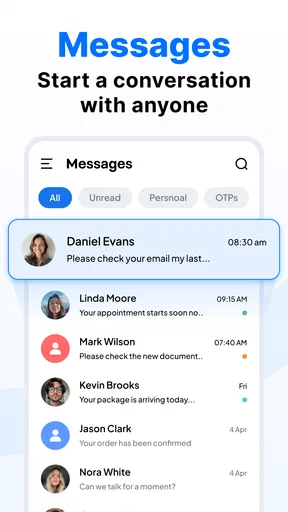
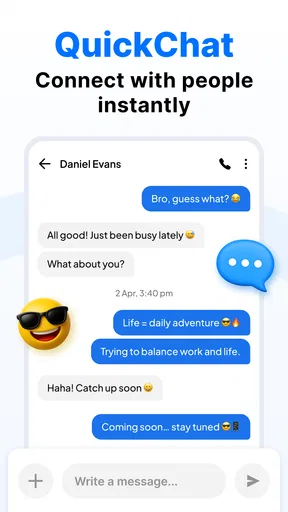

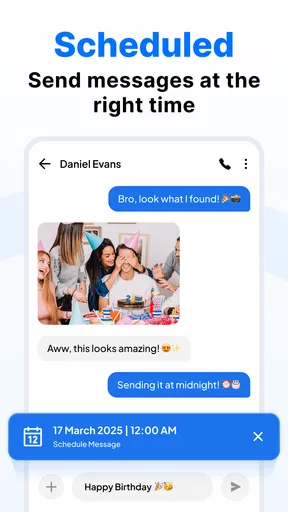
 Analysis by AppCompare
I judge a messaging app less by how many options it promises than by whether it makes ordinary conversations easier to keep up with. SMS Messages App is a communication app from SMS Messages - Messaging App, and its focus is straightforward: handling text conversations in one place. I found the appeal clearest for someone who wants a familiar SMS-style routine with room to make the interface feel more personal, rather than a service built around a completely separate social network.
When the connection matters
Messaging can feel immediate, but delivery still depends on the kind of message and the network conditions around you. SMS and internet-based messaging do not behave identically, so I would not treat every conversation as guaranteed to arrive at once. If I am arranging a pickup or sharing a time-sensitive change, I keep the message short and look for a clear response instead of assuming that silence means the other person has seen it.
That distinction is useful when comparing this app with internet-first alternatives. Those services are often convenient when everyone in a group already uses the same platform and has a data connection. A text-focused app is a more natural fit for everyday SMS habits, but it does not make network delays disappear. For anything urgent, I still choose the communication method that the recipient is most likely to check.
Built for the rhythm of a busy phone
The strongest practical case for a customizable messaging app is a phone that gets used in many different situations: a noisy commute, a quiet office, family plans, and quick exchanges while out running errands. A distinct notification for an important contact can help me decide whether to check the phone, while muting a lively group can keep casual chatter from interrupting everything else.
That kind of setup takes a little thought. I would reserve special notification patterns for only a few people, rather than assigning a different cue to everyone; otherwise, the alerts become another thing to decode. Pinning a conversation also works best for a chat I return to regularly, such as household planning. If the conversation is only temporarily important, unpinning it later keeps the top of the list useful instead of turning it into a permanent collection.
A realistic example is coordinating a family dinner while I am on the move. I can keep the planning thread easy to find, mute it during a meeting, and search for the address later rather than scrolling through every message. The value is not that the app makes the group agree faster; it is that these small organizational choices can reduce the effort of following the conversation.
What to do when a message or attachment stalls
When a text or media message does not appear to go through, I avoid sending it repeatedly right away. First I check whether the phone has a usable connection, then give the conversation a moment and confirm with the recipient through another channel if timing matters. Repeated attempts can create duplicate messages if the first one eventually arrives.
Worth Reading Before You Choose

EA SPORTS FC Mobile 26 Is a Bigger Football Game, but It Takes Time

Flipboard Shows What News Apps Must Do Beyond the Feed

Switching to Android Auto Means Rethinking Your Driving Routine

Google Calendar Makes a Crowded Week Easier to Manage

Ludo King Makes the Most of the Minutes Between Plans

Baby Panda World Brings Quick Play to Modern Phones, but Its Game Library Feels Busy
Photos and videos are more sensitive to connectivity than a short text. If I am on an unreliable connection, I send the essential detail in words first and share the attachment once conditions are better. That is a useful habit with any messaging app: it separates the important information from the media that may take longer to transfer. I also make sure I have selected the intended conversation before retrying, especially when several chats have similar names.
Search and archiving help with recovery of a different kind: finding a detail after the conversation has moved on. I use a distinctive word from the message—such as a street name or event—rather than a vague term that could appear in many chats. Archiving is best for conversations I want out of the main view but may need again; muting is better when I still want the thread visible without constant alerts.
Keeping an eye on data and expectations
Text messages are usually a lighter choice than sending media, so I am selective about large attachments when using mobile data. Before sharing several pictures, I consider whether one clear image will do, or whether it can wait until I am on a more dependable connection. This is not a special trick unique to this app; it is a practical way to avoid making a simple exchange harder than it needs to be.
I also separate SMS from private, internet-based messaging when deciding what to discuss. The original article describes encryption and app locking, but those are consequential privacy claims, so I would verify the current in-app settings and details before relying on them for sensitive conversations. A lock on an app and protection of a message in transit are different things. For confidential work or personal information, I would choose a service whose privacy protections are clearly explained and appropriate to the situation.
A Fresh Take on Messaging
Right from the get-go, the SMS Messages App impressed me with its sleek and intuitive design. Gone are the days of cluttered interfaces and confusing menus. Everything is laid out in a way that just makes sense. You know those apps where you spend more time trying to figure out where everything is than actually using it? Yeah, this isn’t one of them.
Customization Galore
One of the standout features of this app is the level of customization it offers. I was like a kid in a candy store! From themes to fonts, you can tweak just about anything to fit your personal style. I went with a dark theme because, let’s be honest, who doesn’t love a good dark mode?
Not only can you change the appearance, but you can also customize notifications. Choose different sounds or vibration patterns for individual contacts. So, even if your phone is in your pocket, you’ll know exactly who’s pinging you. How cool is that?
Efficiency Meets Simplicity
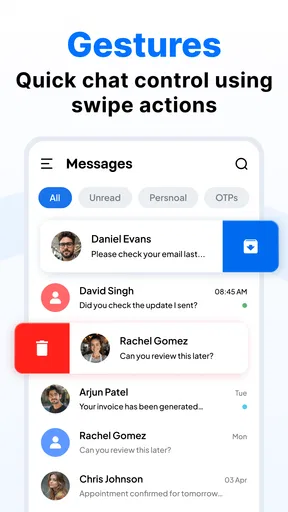
Another aspect that really caught my attention was how effortlessly the app handles group chats. We all have those group texts that blow up our phones with memes and plans, and this app makes it so much easier to manage them. You can mute conversations, pin important ones at the top, or even archive chats you don't need cluttering your main screen.
The search function is another lifesaver. Ever tried scrolling through endless texts to find that one address your friend sent you? With this app, just type a keyword, and voila! There it is. It’s like the app knows what you’re thinking.
Security and Privacy
In today’s world, security is paramount. The app offers end-to-end encryption, so you know your messages are safe from prying eyes. Plus, you can lock the app with a fingerprint or password for an added layer of protection. It’s reassuring to know my conversations are private.
Seamless Integration
Integration with other apps is seamless. Whether you’re sending photos, videos, or even voice notes, the process is smooth and quick. I sent a bunch of pictures to my friend the other day, and the app handled it like a pro. No more waiting around for media to upload.
Who will get the most from it
I would consider this app if I mainly want a customizable place to manage texts, keep busy threads organized, and find older details without digging through a long history. Its audience is broad: the age rating is Everyone, and it is free to install, with optional in-app purchases ranging from around four to twenty-five dollars per item. The current version is 4.1, and it requires Android 8.0 or later.
Its scale offers some context, though not a guarantee of fit: it has over 500,000 installs and an average rating of 4.0 from around 14,000 ratings. Those figures suggest a substantial audience, but I would still decide based on the actual messaging habits I need to support. It was released on August 28, 2024, and the developer is SMS Messages - Messaging App.
I would skip it if my main priority were a cross-platform social space where every participant shares rich reactions, calls, and synchronized features. In that case, a popular internet-based messenger may be a better match, especially when my friends or coworkers already use it. Likewise, someone who wants the simplest possible default texting experience may not care enough about themes, notification choices, or conversation organization to justify changing apps.
Choosing between familiar alternatives
Compared with a phone’s standard messaging app, the attraction here is the prospect of more personal control over how conversations look and how they surface. The trade-off is that switching apps can change familiar habits: I may need to learn where settings are, decide which conversations deserve special treatment, and check that the app fits the way I already handle messages.
Compared with internet-first messengers, SMS-oriented use is valuable for contacts who communicate by ordinary texts rather than through a shared platform. But people should not assume that all messaging apps deliver the same features or privacy model just because they all show chat bubbles. I choose based on the recipient, the kind of message, connectivity, and whether privacy or group tools matter more than convenience.
Before making it my everyday default, I would test a few low-stakes conversations: reply to a contact, send a small attachment, mute a busy group, and search for an older message. That gives a better sense of notification behavior and navigation than changing every setting at once. I would also check which features are included without paying, since the app offers in-app purchases and the free starting point may not cover every preference.
Wrapping It Up
So, after spending some quality time with the app, I can confidently say it has revolutionized the way I handle texting. It’s like having a personal assistant for your messages, and who wouldn’t want that?
If you’re tired of the same old messaging apps and want something that combines functionality with a touch of personal flair, give this one a shot. You won’t regret it. It’s available for download on both Android and iOS, so no one’s left out.
In a world where communication is key, this app is a game-changer. Trust me, your thumbs will thank you!
My connectivity verdict
I see the best fit as someone who values a tidy, adjustable SMS routine and is willing to manage expectations when signal quality or media transfers get in the way. The useful habits are simple: keep urgent messages concise, avoid resending during a delay, use search terms that narrow the conversation, and treat large attachments differently from plain text.
My recommendation is measured rather than universal. It may make daily texting feel more organized, but it cannot solve weak connectivity or replace a messenger that your whole circle already relies on. If those limits suit your needs, it is worth trying; if seamless internet-based group communication or clearly documented privacy assurances are your priorities, I would compare alternatives before settling on it.
Pros
- User-friendly interface for easy navigation.
- Supports multimedia messages seamlessly.
- Customizable themes and fonts.
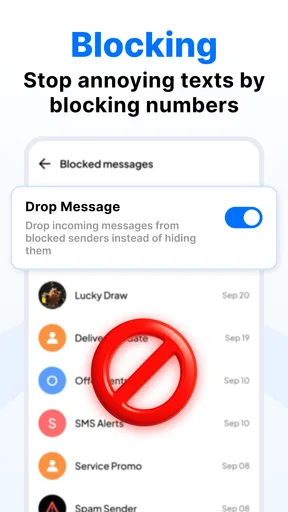
- Effective spam and filter settings.
- Quick and responsive customer support.
Cons
- Limited integration with third-party apps.
- Ads can be intrusive at times.
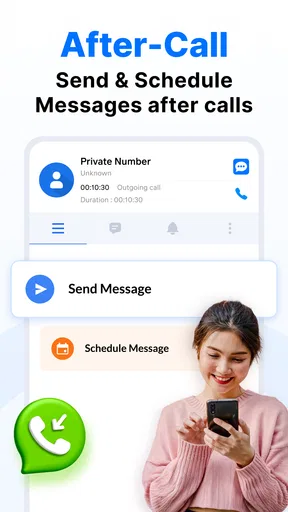
- No scheduled messaging feature.
- Occasional delivery delays reported.
- Lacks advanced encryption options.
FAQs for SMS Messages App
What features does the SMS Messages App offer?
The SMS Messages App provides a range of features designed for efficient communication. Users can enjoy customizable themes, group messaging, scheduled messages, and emoji support. Additionally, it offers backup options, spam protection, and a user-friendly interface that enhances the overall texting experience.
Is the SMS Messages App secure and private?
Yes, the SMS Messages App prioritizes user security and privacy. It includes end-to-end encryption for messages, ensuring that your conversations remain private. Additionally, it provides options to block unwanted contacts and has robust spam filtering features to protect against phishing and unwanted messages.
Can I customize the appearance of my messages?
Absolutely! The SMS Messages App offers extensive customization options. Users can choose from various themes, adjust font sizes, and change the color schemes to suit personal preferences. This level of customization allows users to personalize their messaging experience fully.
Does the SMS Messages App support multimedia messaging?
Yes, the app supports multimedia messaging, allowing users to send and receive photos, videos, and audio clips seamlessly. This feature is integrated into the app to ensure that users can communicate not just with text, but also with rich media, enhancing the messaging experience.
Is the SMS Messages App compatible with both Android and iOS?
The SMS Messages App is designed to be compatible with both Android and iOS platforms. This ensures a wide range of users can access its features regardless of their device. The app is regularly updated to maintain compatibility and performance across different operating systems.


